Design Studio by Saurabh · Remote, US & UK hours
UI/UX design services for apps, websites and products
UI/UX design services for startups in the US and UK: research-led app and web design in Figma, from first sketch to developer-ready screens people find easy to use.
If you're building an app or a website and it needs to make sense to real people, my UI/UX design services cover the whole path: research, flows, wireframes, final screens and handoff. I work with founders, startups and product teams who have an idea, a half-built product or a design that isn't working, and who want someone to own the design properly.
The problem I usually walk into is simple to describe and hard to fix. People open the product and don't know where to start, or they start and drop off halfway. Pretty screens don't solve that. Understanding why people tap, scroll and stay does, and that's where I begin. Research first, pixels second.
Working with a team in the UK or USA? See my UI/UX and product design services for the UK, USA and India.
Show, do not tell
What UI/UX design services actually change
Scroll and watch one cluttered screen get fixed, one decision at a time. No new features, no new content, only design.
- 01
Before: everything is shouting
Five links, three loud buttons and grey text on grey. Nothing tells the eye where to start, so people stall or leave.
- 02
Hierarchy
One headline leads. Size and weight now say what matters first, second and third.
- 03
Spacing
Everything snaps to an 8 point grid. Related things sit together, so the screen reads in groups instead of fragments.
- 04
Contrast
Text is dark enough to read outdoors on a budget phone. Colour is saved for the one thing that needs attention.
- 05
Focus
One primary action per screen. The other choices are still there, just quieter.
- 06
Feedback
Labels stay visible, hints explain themselves and every tap answers back. That is the gap between pretty and usable.
Book your first class
Welcome to our studio app where you can find classes and offers and more things. Pick a time that suits you. Your first session is free.
Try it yourself
Same content. Drag to compare.
Left is what many teams ship first. Right is the same screen after a UI/UX design pass. Drag the handle or use the arrow keys.
Book your first class
Welcome to our studio app where you can find classes and offers and more things. Pick a time that suits you. Your first session is free.
What is included
What I design
Mobile apps
for iOS and Android: user flows, wireframes, high-fidelity screens and interactive prototypes
Websites and landing pages
that explain your product clearly and turn visitors into customers
Web apps and dashboards
where complex workflows need to feel simple
Information architecture
how screens, sections and navigation fit together
Design systems and component libraries
in Figma, built with Auto Layout, variants and tokens
Micro-interactions and UI transitions
that give feedback and guide attention
UX copy
for buttons, empty states and error messages, written in plain language
The process
How a project works
- 01
Discovery
We talk about your users, your goals and what "working" means for this product. I also read whatever you already have: analytics, support tickets, reviews.
- 02
Research
Depending on scope, that's user interviews, a quick competitive scan or a heuristic review of the current product. I map what I find with affinity diagrams in FigJam or Miro so the patterns are visible.
- 03
Structure and wireframes
I sketch the information architecture and key user flows, then low-fidelity wireframes. Changing your mind is cheapest here.
- 04
Visual design
High-fidelity UI in Figma with a consistent type scale, colour system and components. Every screen is designed for real content, real errors and real phones.
- 05
Prototype and test
Clickable prototypes for stakeholder reviews and quick usability tests. When it helps, I deploy a live prototype on Vercel so you can try it on your own phone.
- 06
Handoff and support
Clean Figma files ready for Dev Mode, with specs, states and notes. I stay around during the build to answer questions and review what ships.
Deliverables
What you get
| Deliverable | What it is | Format |
|---|---|---|
| Research summary | Key findings, user problems and opportunities from interviews or audits | FigJam or PDF |
| User flows and IA | How people move through the product, screen by screen | FigJam |
| Wireframes | Low-fidelity layouts for every key screen | Figma |
| High-fidelity UI | Final screens with all states (empty, loading, error, success) | Figma |
| Interactive prototype | Clickable flows for reviews and usability testing | Figma or live link on Vercel |
| Design system | Reusable components, colours, type and spacing | Figma library |
| Developer handoff | Specs, assets and annotations, organised for the build | Figma Dev Mode |
Why me
Why work with me
Shipped proof
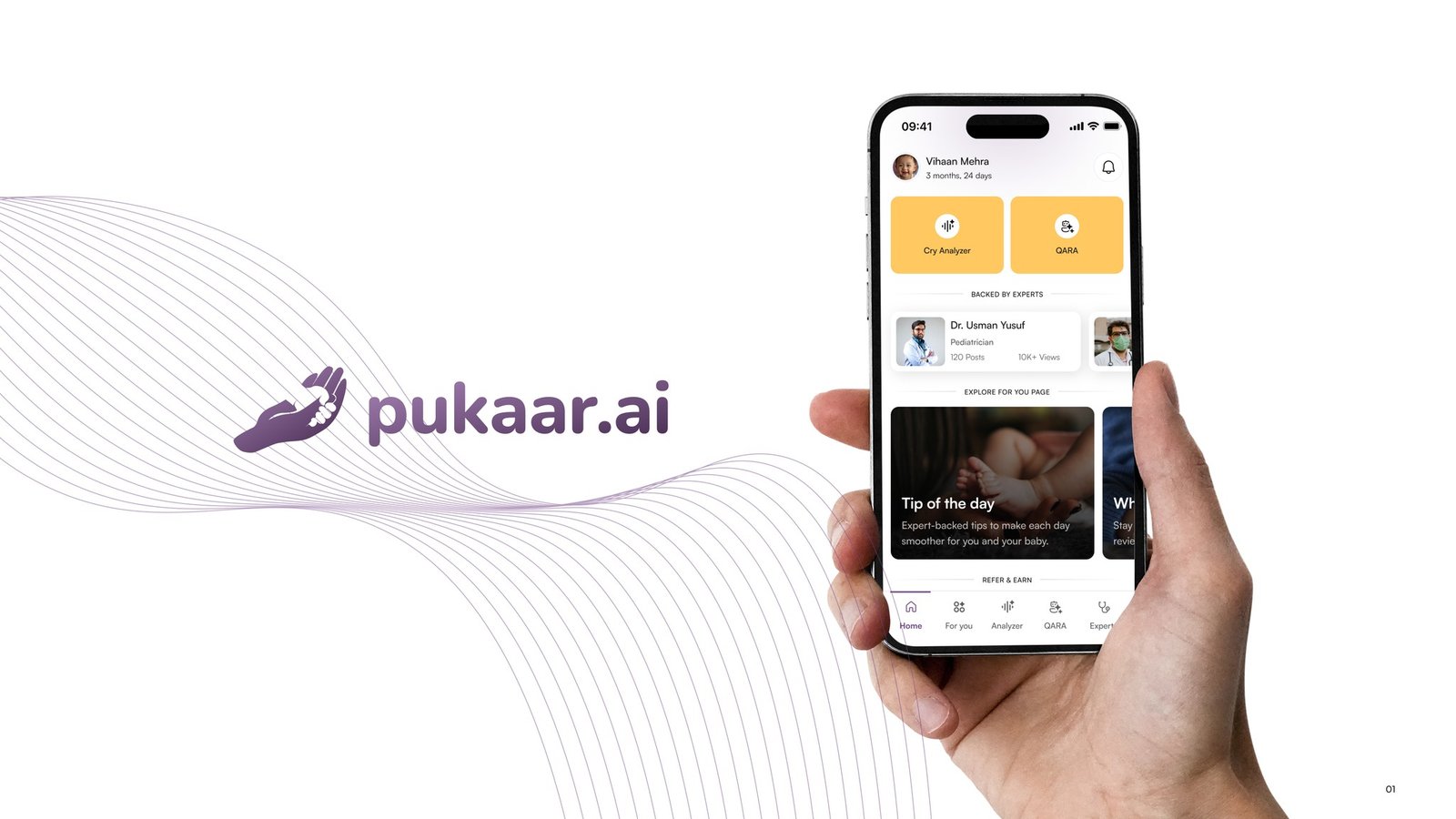
I was the UX researcher and interaction designer on Pukaar.ai, a babycare app featured on Shark Tank India, from zero to live in 15 weeks. It now has 50K+ downloads on Google Play. I also redesigned Demerara Bank’s mobile app and web banking on one shared design system.
Research is built in, not bolted on
User interviews, usability testing and heuristic evaluation are part of my everyday work at Ksolves, where I design web and mobile products end to end.
A motion background
I spent years as a motion designer at Algoworks and Virohan before moving to UX. It's why my interfaces have clear feedback and transitions that make sense.
Developer-friendly files
I build components with Auto Layout and variants and hand off in Figma Dev Mode, so developers aren't guessing.
Fast, honest feedback loops
I use Claude and ChatGPT for ideation and UX copy drafts, and Vercel for live prototypes, which means you see working ideas sooner. The design decisions stay mine.
From my work
On Pukaar.ai, parents told us about the 2 a.m. moment: a crying baby, one free hand, no patience. So I moved the questionnaire behind the recording, put primary actions in the bottom third of the screen and got the cry-to-answer path under 90 seconds. Read the full Pukaar.ai case study.
If you want to see how I think before we talk, start with research first, pixels second or my mobile app design process, step by step.
Meet the people behind the work.
Different minds, shared curiosity. A small team making thoughtful products together, from first research to launch.
10 people, one team
Saurabh Yadav
Founder & Lead Designer

Shiney Jacob
UI/UX Designer

Devwrat Pandey
UI/UX Designer

Sanju Vishwash
UI/UX & Motion Designer

Vipin Meena
Product Designer

Pallavi Singh
UX Writer
Sanchita Halder
React Developer

Himanshu Gupta
Developer

Vaibhav Singh
QA Engineer

Chirag Arora
SEO | AEO Specialist
Design
- Saurabh YadavFounder & Lead Designer
- Shiney JacobUI/UX Designer
- Devwrat PandeyUI/UX Designer
- Sanju VishwashUI/UX & Motion Designer
- Vipin MeenaProduct Designer
Writing, engineering, QA & SEO
Do you work with clients in the US and UK?
Yes. We're based in India and work remotely with startups and product teams in the US, UK and Europe. Projects run over video calls, shared Figma files and FigJam boards, and our hours overlap with UK afternoons and US East Coast mornings.
How much do your UI/UX design services cost?
It depends on scope: the number of screens, how much research is needed, if you need a design system, and the timeline. I don't quote a flat rate because two "10 screen apps" can be very different jobs. Share your project details and I'll reply with an approach and an estimate.
Is Design Studio by Saurabh an agency or a freelancer?
We’re a founder-led design studio. You work directly with Saurabh, the founder and lead designer, from the first call to handoff, so nothing gets lost between an account manager and a junior designer. You get a studio’s process without agency overheads, and if a project needs more hands, we’ll tell you honestly.
What tools do you design in?
Figma for UI, components and prototypes (Auto Layout, variants and Dev Mode for handoff), and FigJam or Miro for research and flows. For motion I use After Effects, Rive, Lottie and Figma Smart Animate. Your developers get files they can build from directly.
Can you redesign an app or website we already have?
Yes, and it's often the best place to start. I'll review what exists, talk to a few users if possible, and find where people get stuck before changing anything. That way the redesign fixes real problems instead of just changing the look.
Related reading
All articles
UI/UX design agency costs in the US and UK (2026): what you actually pay for
What UI/UX design agencies charge in the US and UK in 2026, why quotes vary so much, how remote studios compare, and how to budget an app or SaaS design project.
Read article
How to hire a UI/UX designer (without regretting it)
How to hire a UI/UX designer: define the role, read a portfolio for thinking, run a fair interview, spot red flags and set up the first month well.
Read article
My mobile app design process, step by step
My mobile app design process, step by step: research, flows, wireframes, UI, testing and handoff, plus what I'd skip and what I never skip on a project.
Read articleLet's build something people actually use
If you're looking to hire a UI/UX designer who starts with your users and finishes with files your developers can ship, I'd love to hear what you're working on. Tell me about the product, who it's for and where it feels stuck. Just share your project details and I'll get back to you with how I'd approach it.